fabric-mirror-configure-connection-profile
Connection Profile Name: Enter a name that uniquely identifies the external resource.
Namespace:.Select the namespace where the profile will be stored. All users who will use this profile must have READ and SELECT permissions on the namespace.
Endpoint Type: Select FabricMirror.
Authentication Type: Select Microsoft Entra Service Principal or Microsoft Entra Password.
Setting Microsoft Entra Service Principal properties
To use an Entra Service Principal to connect to Fabric mirroring:
Register an application with the Microsoft identity platform as described in Learn / Microsoft Entra / Microsoft identity platform / Quickstart: Register an application with the Microsoft identity platform.
Add a client secret for the application. Copy the client secret as you will need to enter it in the connection profile dialog.
Navigate to your Fabric workspace, select Manage Access (see Learn / Microsoft Fabric / Fundamentals / Give users access to workspaces), select the application you registered above, and assign it the Contributor role.
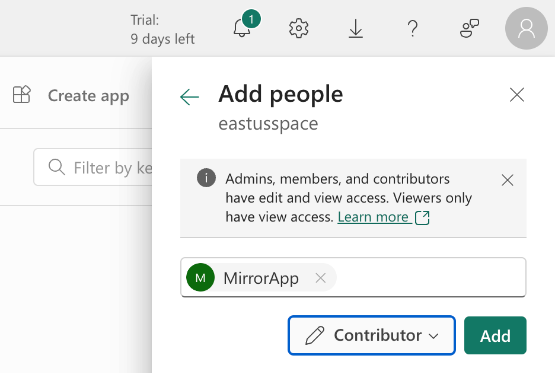
Set the following properties in your connection profile:
Client ID: Enter the Application (client) ID from your application's Overview page.
Client Secret: Enter the client secret from step 2 above.
Tenant ID: Enter the Directory (tenant) ID from your application's Overview page.
Workspace Entity: After entering values for the above properties, select the workspace you want to mirror to.
When you rotate the Entra ID token, applications using this connection profile will automatically switch to the new token. The ConnectionProfile_TokenIsExpiring Smart Alert will by default send you an alert 24 hours before the token expires (see Managing Smart Alerts).
Setting Microsoft Entra Password properties
Username: Enter the name of a Fabric user with the Contributor, Member, or Admin role on the workspace that will contain the target tables. See Learn / Microsoft Fabric / Get Started / Give users access to workspaces.
In this release, Microsoft Entra Password authentication will fail if multi-factor authentication is enabled. To work around that limitation, use Microsoft Entra Service Principal authentication instead.
Password: Enter the password for the specified user.
Workspace Entity: After entering the username and password, select the workspace you want to mirror to.